Category: Camera Basics

  • Unleash the Power: The Transformative Benefits of Using a Circular Polarizing Filter

    Unleash the Power: The Transformative Benefits of Using a Circular Polarizing Filter

    For photographers seeking to elevate their craft and capture breathtaking images, a circular polarizing filter (CPL) is an indispensable tool. This unassuming accessory, often overlooked by amateur shutterbugs, holds the remarkable power to transform ordinary shots into extraordinary visual masterpieces. By harnessing the principles of polarized light, a CPL filter unlocks a realm of creative possibilities, allowing photographers to exercise precise control over the light entering their camera’s lens. Let’s delve into the compelling benefits that make this filter a must-have in every photographer’s arsenal.

    1. Eliminating Unwanted Reflections

    One of the most significant advantages of a circular polarizing filter is its ability to minimize or eliminate unwanted reflections from non-metallic surfaces. Whether you’re shooting a tranquil lake, a glistening car body, or a storefront window, reflections can often obscure the desired subject and diminish image quality. By rotating the CPL filter, photographers can selectively reduce or eliminate these reflections, revealing the true colors and details that would otherwise be lost.

    2. Enhancing Color Saturation

    Nature’s vibrant hues often appear muted or washed out in photographs, particularly on hazy or overcast days. Enter the circular polarizing filter, which acts as a color-enhancing wizard. By filtering out scattered light waves, a CPL intensifies the saturation of colors, resulting in richer, more vivid tones that truly pop off the frame. From lush green foliage to brilliant blue skies, this filter breathes new life into your images, capturing the true essence of the scene.

    3. Deepening Blue Skies

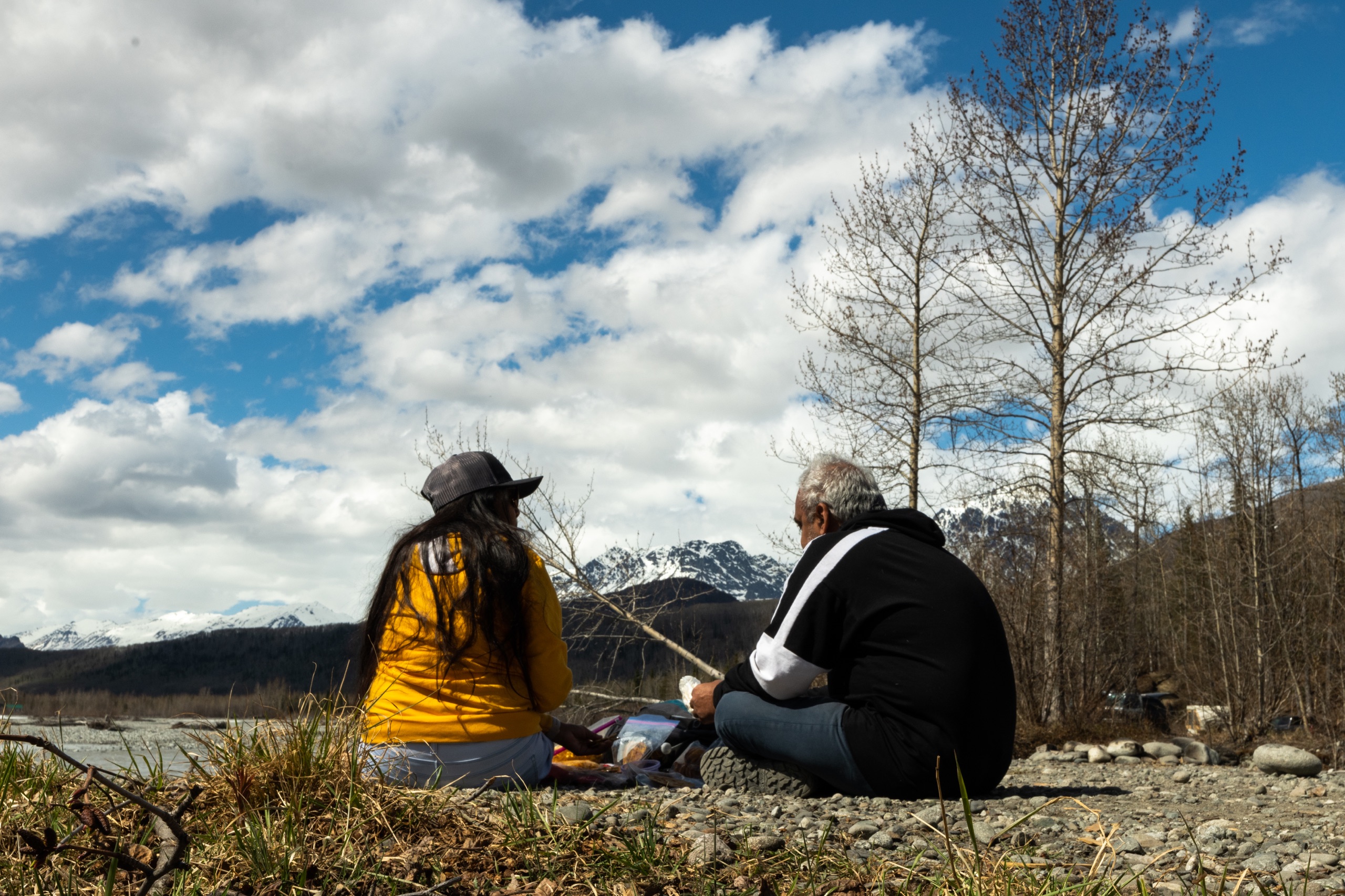
    Few elements in a photograph are as captivating as a deep, rich blue sky. However, atmospheric conditions can sometimes dilute this desired effect, leaving skies appearing flat or hazy. With a circular polarizing filter, photographers can selectively reduce the amount of scattered light entering the lens, effectively deepening the blue tones of the sky. This dramatic enhancement adds depth and dimension to landscape and architectural shots, creating a striking contrast against clouds or built structures.

    4. Minimizing Atmospheric Haze

    Atmospheric haze, caused by suspended particles in the air, can significantly degrade image quality, especially in long-distance shots. This haze can obscure details, reduce contrast, and introduce an unwanted bluish cast to your photographs. By utilizing a circular polarizing filter, photographers can effectively cut through this haze, restoring clarity, crispness, and vibrant colors to their images. This benefit is particularly valuable for landscape, wildlife, and architectural photography, where atmospheric conditions can dramatically impact the final result.

    5. Controlling Metallic Reflections

    While a CPL filter is effective at eliminating reflections from non-metallic surfaces, it can also be used to strategically control and enhance reflections from metallic objects. By rotating the filter, photographers can achieve a desired level of reflection, adding depth, texture, and visual interest to their shots. This technique is particularly useful in product photography, architectural shots, and creative portraiture, where controlled reflections can add an artistic flair.

    6. Creative Flexibility

    Beyond its technical advantages, a circular polarizing filter opens up a world of creative possibilities for photographers. By experimenting with different rotation angles, exposures, and compositions, artists can explore unique visual effects and interpretations. From silky-smooth water surfaces to dramatic contrast enhancements, the creative potential of this filter is limited only by the photographer’s imagination.

    Investing in a high-quality circular polarizing filter is a wise decision for any photographer seeking to elevate their craft and produce images that truly stand out. Whether you’re capturing breathtaking landscapes, vibrant cityscapes, or intricate product shots, this versatile tool empowers you to take control of light, color, and reflections, unlocking a realm of artistic expression that will leave a lasting impression on your audience.

  • Creating Silky Smooth Water Effects in Photography

    Creating Silky Smooth Water Effects in Photography

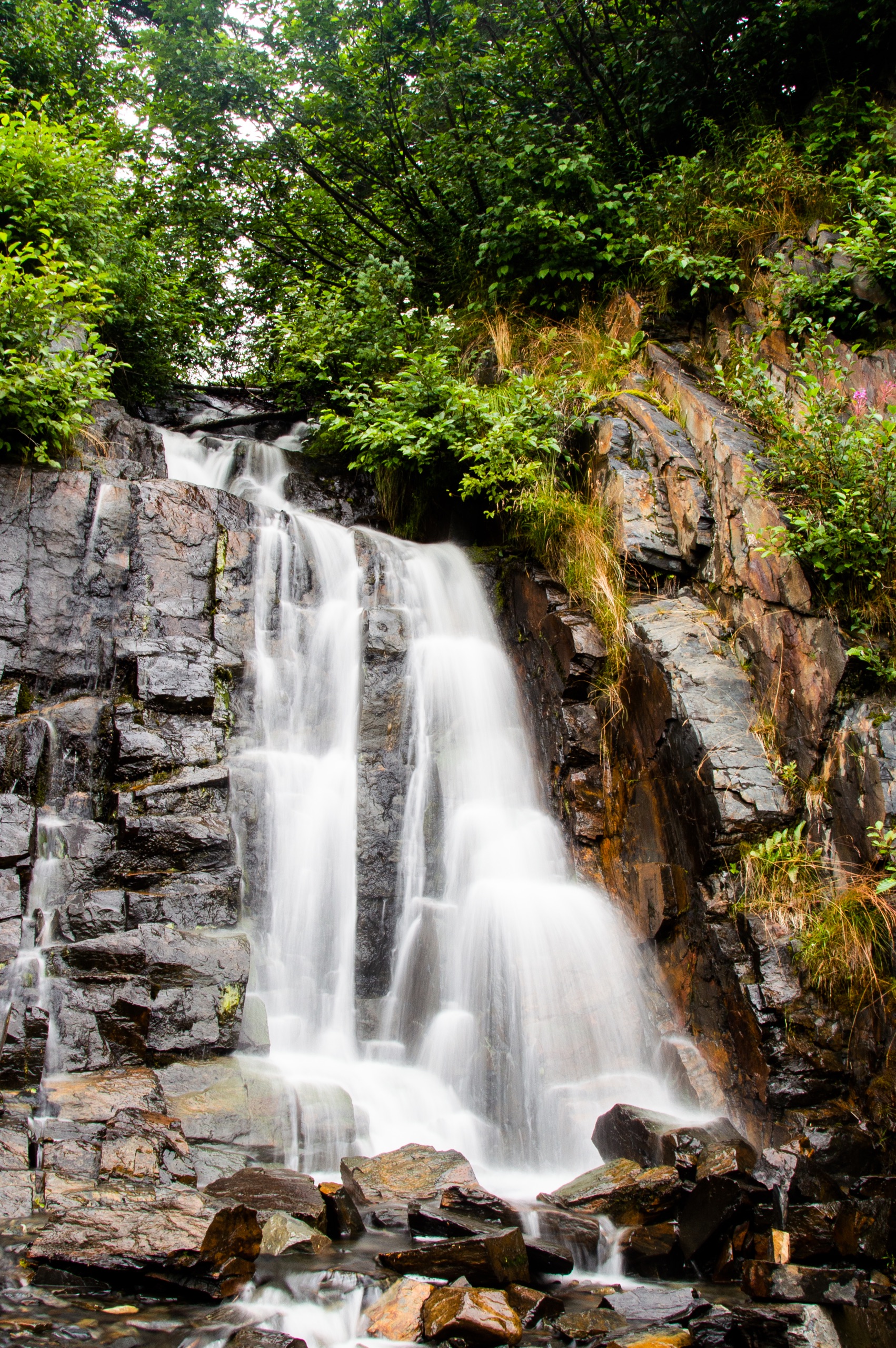
    One of the most visually striking effects you can achieve in photography is making water appear silky smooth. Rather than freezing the motion of rushing water and making it look crisp, using a long exposure blurs the movement and creates an almost ethereal, glossy look. Streams, waterfalls, ocean waves, and even rain can take on an incredibly smooth, dreamy quality with this technique. Here’s how to master creating silky water effects.

    The Gear You’ll Need

    • A DSLR or mirrorless camera that allows full manual control over settings

    • A sturdy tripod to stabilize the camera during the long exposure 

    • A neutral density (ND) filter to allow longer shutter speeds in bright conditions

    • A remote shutter release or self-timer to avoid camera shake when pressing the shutter

    Setting Up Your Camera

    1. Mount your camera on the tripod and frame your composition. Try to shoot at an angle looking slightly down at the water surface for the smoothest look.

    2. Set your camera to Aperture Priority mode and choose a small aperture like f/16 or f/22 for a wide depth of field.

    3. Set your ISO as low as it will go, usually 100 or 200, to minimize noise in the long exposures.

    4. Attach your ND filter – start with a 6-stop ND and go higher (like 10 stops) for even longer exposures if needed.

    Calculating Shutter Speed

    To blur the movement of the water smoothly, you’ll need a long shutter speed, usually several seconds or more. The exact time depends on the speed of the water flow.

    For slower flows like gentle streams, start around 1⁄4 second. For faster rapids or crashing waves, try 2-4 seconds. Adjust up or down based on your initial results. You may need 15-30 seconds for extremely rapid water.

    The camera’s light meter and exposure settings will guide you, but don’t be afraid to experiment with much longer times than the meter suggests for an extreme smoothing effect.

    Other Tips

    Use a remote or self-timer to avoid blurring from touching the camera. Watch your histogram to ensure you aren’t blowing out highlights. Try both horizontal and vertical orientations to vary the sense of motion. Look for unique perspectives and interesting foregrounds.

    With some practice adjusting your shutter speed, you’ll be able to transform any body of water into an atmospheric, velvety flow. Perfectly smooth water can make for some incredibly artistic images with an almost painterly look.

  • The Camera Triangle: The Three Pillars of Photography

    The Camera Triangle: The Three Pillars of Photography

    In photography, there are three fundamental elements that govern the exposure and overall quality of an image: aperture, shutter speed, and ISO. Together, these three form what is known as the “camera triangle” or “exposure triangle.” Mastering the relationship between these three pillars is key to taking well-exposed and visually compelling photographs.

    Aperture

    The aperture refers to the opening inside the camera lens that allows light to travel through and reach the image sensor or film. It is represented by f-numbers like f/2.8, f/5.6, f/11, etc. Larger f-numbers correspond to a smaller aperture opening, while smaller f-numbers indicate a wider aperture opening.

    Aperture controls two crucial aspects of your image: depth of field and brightness. A wider aperture (smaller f-number like f/2.8) creates a shallower depth of field, blurring the background and foreground to isolate your subject. Conversely, a narrower aperture (larger f-number like f/16) keeps more of the scene in focus from front to back.

    Aperture also impacts the brightness of your image. A wider aperture allows more light to hit the sensor, resulting in a brighter exposure. This makes wider apertures ideal for low-light situations or when you want to use faster shutter speeds to freeze motion.

    Shutter Speed

    The shutter speed refers to how long the camera’s sensor is exposed to light for each shot. It is measured in seconds or fractions of a second, like 1/60th, 1/250th, 1/1000th, etc. Longer shutter speeds allow more light in, while shorter speeds let in less light.

    Shutter speed’s primary function is to control motion blur. A fast shutter speed like 1/2000th of a second will freeze action, while a slow shutter like 1/15th of a second will blur any movement, which can be used creatively for pleasing blur effects on flowing water or light trails.

    Slowing down the shutter in low light can lead to camera shake and blurry shots, so a tripod or increasing the ISO may be necessary. Faster shutters require more light or a wider aperture to avoid underexposure.

    ISO

    ISO refers to the image sensor’s light sensitivity setting. It is represented by numbers like 100, 400, 1600, etc. A lower ISO value means less sensitivity to light, while a higher value increases the sensor’s ability to capture light.

    Increasing the ISO allows you to use faster shutter speeds in low light to avoid blur from camera shake or freeze motion. However, higher ISOs also increase digital noise and reduce overall image quality.

    Most photographers try to use the lowest possible ISO that still allows a proper exposure to maximize sharpness and dynamic range in their images. Only when light is extremely low should you raise the ISO substantially.

    Balancing the Triangle

    The three sides of the exposure triangle are aperture, shutter speed, and ISO. Once you understand how each of these elements impacts your image, you can begin balancing them against one another for the desired results.

    For instance, if you want a shallow depth of field to blur the background, you’ll need to use a wide aperture like f/2.8. This lets in lots of light, so you’ll likely need to increase the shutter speed or lower the ISO to avoid overexposure.

    Conversely, if you want to freeze the motion of a fast-moving subject, you’ll need to use a fast shutter speed like 1/2000th of a second. This requires more light, so you may need to open up your aperture for a shallower depth of field or increase your ISO and deal with more noise.

    It’s all about striking the right balance based on your priorities for that particular image. With practice, you’ll develop an intuition for how to juggle these three elements seamlessly to achieve your creative vision.

    Mastering the camera triangle takes time and experience, but developing this key skill allows you to take control of your photographic exposures and intentionally create the kinds of images you want.

  • Capturing Life’s Moments: 1080p vs 4K Video

    Capturing Life’s Moments: 1080p vs 4K Video

    In today’s digital age, high-quality video recording has become more accessible than ever. Two of the most popular resolutions for video capture are 1080p (Full HD) and 4K (Ultra HD). While both formats offer clear and crisp visuals, there are distinct differences in quality, file size, and compatibility that are important to consider. Let’s explore the key factors that set 1080p and 4K video apart.

    Resolution: The Pixel Advantage

    The most significant distinction between 1080p and 4K lies in their resolution, or the number of pixels that make up the video image. 1080p, also known as Full HD, has a resolution of 1920 x 1080 pixels, which translates to around 2 million pixels per frame. On the other hand, 4K, or Ultra HD, boasts a resolution of 3840 x 2160 pixels, packing an impressive 8 million pixels per frame – four times the resolution of 1080p.

    This massive difference in pixel count means that 4K videos can capture far more detail, clarity, and sharpness compared to their 1080p counterparts. When viewed on a large screen or from a close distance, 4K videos appear significantly more lifelike and immersive, with finer textures, smoother lines, and better-defined edges.

    File Size and Storage Requirements

    With higher resolution comes larger file sizes. A single minute of 4K video recorded at 30 frames per second can consume anywhere from 300MB to 600MB of storage space, depending on the bit rate and compression used. In contrast, a minute of 1080p video typically requires between 100MB and 200MB.

    This substantial difference in file size means that capturing and storing 4K video demands more storage space and faster data transfer rates. While modern high-capacity hard drives and cloud storage solutions can accommodate larger 4K files, it’s essential to consider your storage needs, especially if you plan to archive or back up your video collection.

    Compatibility and Playback

    While 4K displays and media players are becoming more prevalent, 1080p remains the more widely adopted and compatible format across various devices and platforms. Most modern smartphones, tablets, laptops, and TVs support playback of 1080p video without any issues, ensuring a smooth viewing experience.

    On the other hand, 4K video may require more powerful hardware and updated software to ensure seamless playback. Older devices or those with limited processing power might struggle to play 4K videos smoothly, resulting in stuttering, frame skipping, or reduced quality.

    Choosing the Right Resolution

    The decision between shooting in 1080p or 4K ultimately depends on your specific needs and priorities. If you value maximum detail, clarity, and future-proofing your video collection, 4K is the way to go, especially if you have the necessary storage capacity and compatible playback devices.

    However, if you primarily share videos on the web, social media, or standard displays, 1080p may be sufficient. It strikes a good balance between quality and manageable file sizes, ensuring compatibility across a wide range of devices.

    Whether you choose 1080p or 4K, both resolutions offer stunning video quality that can capture life’s precious moments with exceptional clarity. As technology continues to evolve, 4K will likely become more ubiquitous, but 1080p will remain a reliable and widely supported option for years to come.

  • So You Want to Buy a DSLR Camera, Now What?

    So You Want to Buy a DSLR Camera, Now What?

    If you’re an aspiring photographer looking to take your skills to the next level, you’ve probably been dreaming about upgrading to a DSLR (digital single lens reflex) camera. DSLRs offer superior image quality, more control over settings, and the ability to use interchangeable lenses compared to point-and-shoot cameras. However, the vast selection of DSLR models and features can be intimidating for a first-time buyer. This guide will help you navigate the process of choosing the right DSLR for your needs and budget.

    Determine Your Budget

    DSLRs can range from a few hundred dollars for an entry-level model to several thousand for a professional-grade camera body. It’s essential to set a realistic budget from the start. Remember that you’ll likely need to buy lenses in addition to the camera body, which can add significant cost. As a beginner, you may want to start with an affordable entry-level or mid-range DSLR and invest in better lenses or accessories later.

    Consider the Sensor Size

    The sensor size is one of the most critical factors in image quality. DSLRs typically use APS-C sensors (smaller than full-frame) or full-frame sensors (same size as 35mm film). Full-frame sensors provide better low-light performance, dynamic range, and overall image quality but come at a higher price point. APS-C sensors are more affordable and still produce excellent results, especially for those just starting out.

    Decide on Important Features

    Different DSLR models offer various features, and it’s essential to prioritize the ones that matter most to you. Here are some key features to consider:

    – Megapixel count: Higher megapixels allow for larger prints or more cropping flexibility, but aren’t everything.

    – Autofocus system: A more advanced autofocus system with more focus points can better track moving subjects.

    – Continuous shooting speed: If you plan to photograph sports or action, a faster continuous shooting rate is desirable.

    – Video capabilities: For videographers, features like 4K video, microphone input, and headphone jack are important.

    – Weather sealing: For outdoor photography, weather-sealed bodies offer better protection against dust and moisture.

    – WiFi/Bluetooth connectivity: These allow for wireless transfer of images to smartphones or tablets.

    Don’t Forget About Lenses

    While the camera body is essential, the lenses you choose will significantly impact your photography. Most DSLR bodies are sold with a basic kit lens, but you’ll likely want to invest in additional lenses for different purposes, such as a telephoto lens for sports or wildlife, a wide-angle lens for landscapes, or a prime lens for portraits with beautiful bokeh (background blur).

    Handling and Ergonomics

    Before making your final decision, try to handle the DSLR models you’re considering in person. Pay attention to how they feel in your hands, the placement of controls, and the overall build quality. A camera that doesn’t feel comfortable or intuitive to use can detract from the enjoyment of photography.

    In conclusion, buying your first DSLR is an exciting step in your photography journey. Take the time to research your options, prioritize the features that align with your goals, and don’t be afraid to seek advice from experienced photographers or camera store staff. With the right DSLR and lens combination, you’ll be well-equipped to capture stunning images and unleash your creativity.

  • How to Calibrate the Lens on Your Camera

    How to Calibrate the Lens on Your Camera

    Getting the sharpest possible images from your camera often requires calibrating the lens to ensure it is perfectly aligned with the sensor. Even minor misalignment issues can result in soft focus or inconsistent sharpness across the frame. Lens calibration is the process of making micro-adjustments to the lens-camera connection to optimize image quality.

    While modern cameras and lenses are manufactured with tight tolerances, there is always the potential for very small deviations that can affect image sharpness. Issues like a slightly tilted sensor, imperfect mounting of the lens, or other miniscule factors can blur or distort your photos and videos.

    Lens calibration allows you to analyze test shots taken with specialty targets or charts, and then tweak the focus parameters until you achieve pixel-level sharpness across the entire frame. Many cameras have built-in lens calibration aids, while third-party software and tools are also available.

    The exact process varies depending on your specific camera model and lenses, but here are some general tips for calibrating your camera lenses:

    1. Use a Robust Tripod and Good Lighting

    Lens calibration requires taking extremely precise test shots, so you’ll need a sturdy tripod and controlled lighting conditions. Avoid any vibration or camera movement when capturing your test images.

    2. Focus on a Flat Target or Chart

    You’ll want to focus on a specialized lens calibration chart or target placed parallel to your camera’s sensor plane. Look for high-contrast patterns that provide measurable data points across the frame.

    3. Take Test Shots at Multiple Focal Lengths and Apertures 

    With zoom lenses, calibration may need to be adjusted across the entire focal range, from wide-angle to telephoto. Similarly, different apertures can also affect focus.

    4. Analyze Your Test Images

    Use your camera’s built-in tools or third-party calibration software to inspect the test shots and quantify any defocusing or alignment issues across different areas of the frame.

    5. Make Micro-Adjustments

    Based on the analysis, you can typically fine-tune focus parameters in your camera to tweak front/back focus misalignment and tilt/shift adjustments. Small incremental changes go a long way.

    6. Shoot New Test Images and Reanalyze

    Recapture test shots after making adjustments and recheck the results. You may need to iterate on this process several times to achieve optimal sharpness.

    While the calibration process can be time-consuming, putting in the effort upfront to perfectly align each lens pays off with sharper, more consistent image quality. Many professional photographers consider lens calibration an essential periodic maintenance task to get the most out of their gear.

  • Mastering Subject Positioning for Flattering Portrait Photos

    Mastering Subject Positioning for Flattering Portrait Photos

    When it comes to taking great portrait photos, the positioning and pose of your subject is crucial. The way you position your subject’s body, face, and limbs can either flatter or distort their natural looks. Proper positioning helps capture your subject’s best angles, minimizes any insecurities they may have, and creates more dynamic and visually-appealing portraits.  

    Here are some tips for positioning your subject for flattering portrait shots:

    Face the Subject Slightly Off-Center

    Rather than having your subject face the camera head-on, position them at a slight angle, with their body turned about 15-30 degrees away from making direct eye contact with the lens. This slightly off-center angle is generally more interesting and flattering than a straight-on angle.

    Use Angles to Slim the Face

    If your subject is concerned about a rounder or fuller face, position them with their chin angled slightly down towards the camera. This angle minimizes any bagginess under the chin and creates a subtle slimming effect on the face. You can also have them tilt their head up and look slightly toward the camera which elongates the neck.

    Avoid Extreme Upward or Downward Angles

    Stay away from shooting directly above or below your subject’s eye line, as these angles can distort facial features in unflattering ways. Shoot from a vantage point at around the subject’s eye level or just slightly above for the most flattering perspectives.

    Watch Your Subject’s Posture

    Poor posture in a subject can make them look stiff, hunched, and smaller than they actually are. Guide your subject into an upright, elongated posture with their shoulders pulled slightly back. This opens up the chest and neck area and gives a taller, more confident look. However, don’t have them push their shoulders too far back which can look overly rigid.

    Consider Arm and Hand Placement 

    Thoughtful arm and hand placement can make a big difference in portraits. Having subjects bend one arm at the elbow and place that hand on their hip or waist often looks natural and flattering. Avoid letting their arms hang stiffly at their sides. Play around with simple hand and arm positions until you find one that looks relaxed yet intentional.

    Use Props for More Natural Positioning

    If your subject seems stiff or isn’t sure what to do with their hands and body, try incorporating simple props like a stool or chair for them to rest a hand or elbow on. Holding things like coffee mugs, books, sunglasses, or other small objects can help them relax into a more natural pose while giving you opportunities to capture interesting detail shots.

    The positioning of your subject has a huge impact on the overall look and feel of your portrait photos. With some basic principles and practice guiding your subjects into flattering poses, you’ll be able to consistently create beautiful, confidence-boosting portraits.

  • The Battle Between Crop Sensor and Full-Frame: Pros and Cons

    The Battle Between Crop Sensor and Full-Frame: Pros and Cons

    When it comes to digital cameras, one of the key decisions photographers face is whether to opt for a crop sensor (APS-C) or a full-frame sensor. Both sensor types have their own unique advantages and disadvantages, making the choice a matter of individual preference and shooting needs. In this article, we’ll delve into the pros and cons of crop sensor cameras, helping you make an informed decision.

    Pros of Crop Sensor Cameras:

    1. Affordability: One of the most significant advantages of crop sensor cameras is their cost-effectiveness. Due to their smaller sensor size and less complex manufacturing process, these cameras are generally more budget-friendly than their full-frame counterparts, making them an excellent choice for beginners or those on a tight budget.

    2. Effective Focal Length Magnification: Crop sensor cameras effectively magnify the focal length of lenses, providing a longer reach without the need for additional expensive telephoto lenses. This makes them ideal for sports, wildlife, and action photography, where you might need to capture distant subjects.

    3. Depth of Field Control: The smaller sensor size of crop sensor cameras results in a deeper depth of field compared to full-frame cameras when using the same aperture and focal length. This can be advantageous for landscape and macro photography, where you want to keep more of the scene in focus.

    4. Compact and Lightweight Design: Crop sensor cameras are typically smaller and lighter than full-frame models, making them more portable and easier to carry around for extended periods, especially when traveling or hiking.

    Cons of Crop Sensor Cameras:

    1. Image Quality and Low-Light Performance: While crop sensor cameras have come a long way in terms of image quality, they still generally lag behind their full-frame counterparts in terms of overall image quality, dynamic range, and low-light performance. The smaller sensor size means smaller individual pixels, which can result in more noise and less detail in low-light situations.

    2. Limited Wide-Angle Capabilities: Due to the crop factor, wide-angle lenses on crop sensor cameras don’t provide the same field of view as they would on a full-frame camera. This can be limiting for certain types of photography, such as architecture, landscapes, and astrophotography, where a wider field of view is desirable.

    3. Depth of Field Issues: While the deeper depth of field can be an advantage in some situations, it can also be a hindrance in others. For example, when shooting portraits, you may find it more challenging to achieve a pleasingly blurred background (bokeh) with a crop sensor camera.

    4. Resale Value: Full-frame cameras generally hold their value better than crop sensor models, making them a better long-term investment if you plan to upgrade or sell your gear in the future.

    In conclusion, crop sensor cameras offer an excellent balance of affordability, portability, and capabilities that make them a great choice for many photographers, particularly those starting out or those who prioritize cost-effectiveness and versatility. However, if you demand the highest possible image quality, low-light performance, and wide-angle capabilities, a full-frame camera might be the better option, albeit at a higher price point. Ultimately, the decision comes down to your specific needs, shooting style, and budget.

  • Tips for Stunning Bird Photography

    Tips for Stunning Bird Photography

    Bird photography can be incredibly rewarding, capturing beautiful feathered creatures in their natural habitats. However, it also presents some unique challenges due to the small size and constant motion of birds. Here are some tips to help you take your bird photography to new heights:

    1. Use the Right Gear

    Invest in a camera with a fast autofocus system and high fps burst mode for capturing birds in flight. A telephoto lens with a focal length of 400mm or higher will allow you to get up close shots from a distance without disturbing your subjects. A tripod or monopod can also be very helpful for stability with those heavy lenses.

    2. Master Your Camera Settings  

    Set your camera to aperture priority mode and use a wide aperture like f/4 or f/5.6 to blur backgrounds and make your bird stand out. Increase your ISO as needed to get a fast enough shutter speed (at least 1/1000 sec) to freeze motion. Continuous autofocus mode is also essential for tracking birds.

    3. Find the Best Light

    Early morning and late afternoon light is generally most flattering for photographing birds, avoiding the harsh shadows of midday sun. Look for backgrounds that won’t be too cluttered or distracting. Being positioned with the sun behind you is ideal.

    4. Know Your Subject  

    Study the behavior patterns and habitats of the birds you want to photograph. Understanding their calls, flight patterns, nesting seasons, and favored perches will greatly increase your odds of getting close enough for great shots.

    5. Stay Low and Still 

    Birds are less threatened by objects below them than those at human eye level. Getting low to the ground and remaining still will put subjects more at ease. Use blinds or camouflage if needed. Move slowly and avoid sudden movements that will startle birds.

    6. Be Patient and Persistent 

    Bird photography requires a healthy dose of patience and many hours spent in the field simply observing and waiting for that perfect shot opportunity. Don’t get discouraged. The more time you invest, the more your skills will improve.

    With the right techniques and dedication, you’ll be able to create amazing bird imagery that shows off the beauty and complexity of these remarkable creatures.

  • Mastering Bracketing for Stunning Photos

    Mastering Bracketing for Stunning Photos

    In photography, bracketing is the technique of taking multiple shots of the same scene with different exposure settings. This is an incredibly useful tool that can help you get perfectly exposed images, especially in challenging lighting situations. Here’s why you should use bracketing and some tips to get the best results.

    Why Use Bracketing?

    1. Tricky Lighting Situations – Scenes with high contrast due to bright highlights and deep shadows can be difficult to meter and expose properly with a single shot. Bracketing allows you to capture multiple exposures to ensure you get one that is well-balanced.

    2. HDR Photography – Bracketing is essential for high dynamic range (HDR) photography. By combining bracketed images with different exposures, you can create HDR composites with an incredible range of lightness and darkness.

    3. Increased Chances of Nailing Exposure – With auto-exposure, your camera may slightly over or underexpose the image. Bracketing gives you a higher chance that at least one shot has the optimal exposure.

    Tips for Great Bracketed Shots

    1. Use a Tripod – Since you’re taking multiple shots, a sturdy tripod is a must to ensure perfect alignment between your bracketed frames for smooth blending in post-processing.

    2. Set Bracketing on Your Camera – Most DSLRs and mirrorless cameras have auto-bracketing modes that allow you to set how many shots are taken and the exposure variance between each shot.

    3. Start With the Proper Exposure – Take a properly metered shot first, then set bracketing to under and overexpose based on that reading. A typical bracketing setup is -2, 0, +2 stops.

    4. Use Aperture Priority Mode – This allows you to control depth of field while the camera adjusts shutter speed for the bracketed exposures.

    5. Take More Frames if Needed – If the contrast is extreme, you may need to bracket with an even wider range, like -3 to +3 stops.

    6. Watch Your Histogram – Check the histogram after your bracketed burst to ensure you’ve fully covered the exposure range.

    7. Shoot in RAW – RAW image files contain more data than JPEGs, giving you more flexibility with blending in post-production.

    With bracketed exposures, you dramatically increase your chances of ending up with perfectly lit images, even in challenging conditions. It may add an extra step, but bracketing is a powerful tool that can take your photography to new heights.